
In this guide 16 sections
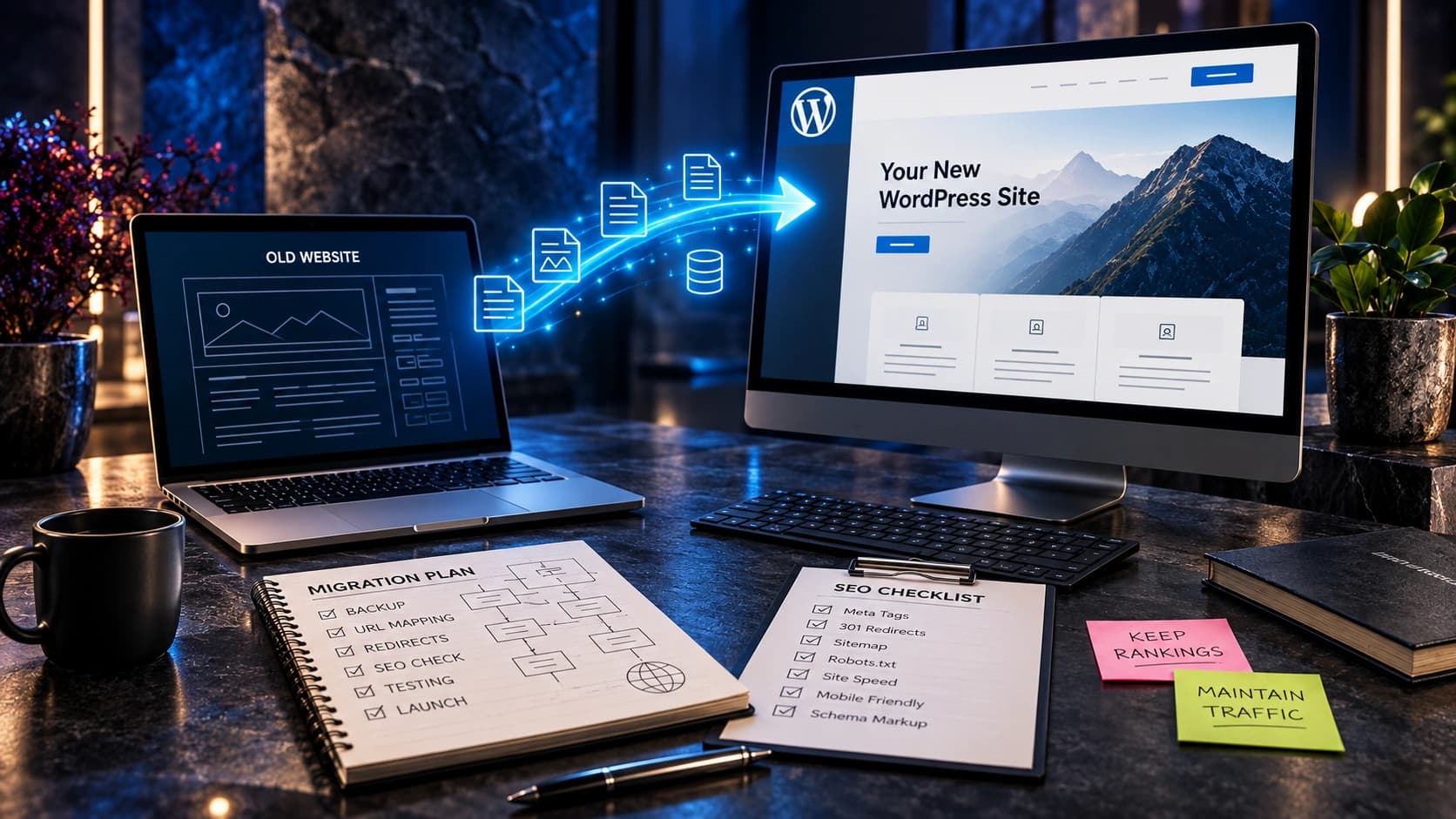
How should you plan a website content migration? Inventory the current pages and files, decide which content to keep or change, map every important old URL to its new destination, preserve useful search information, test forms and media, and monitor the live site after launch. A migration is not complete just because the new homepage looks good. The objective is to protect information customers need and keep enquiry pathways working while the website changes.
This practical plan applies to service businesses moving to a new CMS, redesigning their website, or reorganizing existing pages.
Define the migration scope before moving pages
A website content migration can involve moving to a new CMS, changing domains, redesigning templates, consolidating pages, or replacing old copy. These changes carry different risks. Start by documenting what is changing and what should remain stable. Identify the people who own content approval, technical implementation, redirects, and lead integrations. Set a realistic content freeze period so late edits to the old site do not disappear. Record the current hosting, domain configuration, analytics, forms, and major plugins. Agree on the definition of completion: every important page must be present or intentionally retired, essential links must work, and enquiries must reach the correct team. A migration is not finished merely because the new homepage looks attractive. Clarify whether the project includes rewriting content, replacing photographs, migrating downloadable files, and updating SEO metadata. Without a written scope, teams frequently discover missing work only after the new site is live.
Create a full inventory of existing content
List the existing URLs, page titles, content types, images, PDFs, and important downloadable resources. Include pages not visible in navigation that may still receive search visits or referrals. Record each URL’s purpose, owner, current status, and whether it generates useful enquiries. Search Console and analytics can help identify pages with valuable traffic, but low traffic alone does not prove a page is unnecessary. Some content serves niche customers or seasonal needs. Capture the current title tags, headings, canonical URLs, and relevant structured data. Note internal links and important external backlinks when available. Include privacy notices, thank-you pages, and service-area information. Use a spreadsheet or structured document with clear columns so the development and content teams can work from the same source. This inventory becomes the baseline for confirming that important information was not lost during the migration.
Decide which pages to keep, improve, merge or retire
Every existing URL needs a deliberate decision. Keep accurate and useful pages, improve content that remains relevant but is outdated, merge pages that answer substantially the same customer question, and retire information that no longer serves a purpose. Do not automatically copy every old page into the new system. Equally, do not delete pages simply because they have a dated visual style. Review business value, search demand, backlinks, customer questions, and legal requirements. When merging two services, preserve unique information that customers still need. If a service is no longer offered, make sure the website does not continue promising it. Assign an owner to approve each decision and the new content destination. A clear content disposition prevents duplicated topics and protects important information during redesign. Record decisions so later SEO or customer-support questions can be traced to the migration plan.
Map every old URL to an intended destination
Create an old-to-new URL mapping document before launch. For each old address, specify whether it stays unchanged, redirects to a relevant new page, or is intentionally retired. Avoid redirecting every deleted page to the homepage, because that may not satisfy the visitor’s original purpose. Use appropriate permanent redirects for genuine moves and check for redirect chains or loops. Google’s site-move documentation provides guidance on mapping URLs and preserving discoverability. Include trailing slashes, capitalization differences, domain variants, and important files when relevant. If the site has multiple languages or locations, review each variant carefully. Keep the mapping accessible to the technical team and content reviewers. After launch, test the destination of each high-value old URL rather than checking only whether it returns a successful response. A redirect to an irrelevant page can be technically functional but still harm the customer experience.
Preserve useful page meaning and SEO signals
When redesigning a page, retain the information that made it valuable to visitors. Record the original service scope, useful answers, headings, title tags, and internal links. Rewrite unclear copy where necessary, but avoid changing every URL, topic, and page purpose simultaneously without a reason. Create descriptive new titles and meta descriptions that accurately represent the content. Check canonical tags, indexability, sitemap inclusion, and robots settings before and after launch. Staging noindex settings must not accidentally remain on production pages. Google’s SEO Starter Guide emphasizes clear site structure and useful content. Do not assume that adding more keywords will protect rankings. Search engines need time to process changes, and outcomes are never guaranteed. Preserving a coherent topic, relevant links, and a usable page helps maintain continuity for both search visitors and existing customers.

Move images, PDFs and media with care
Content includes more than paragraphs. Important project photographs, diagrams, downloads, and PDFs may be linked from emails, search results, or customer documentation. Inventory those assets and identify where they are used. Confirm permission to reuse client photographs and branding. Avoid presenting generic stock imagery as actual project work. Resize and optimize images appropriately, preserve meaningful alternative text, and test mobile crops. If asset URLs change, update internal references and consider whether redirects are needed for heavily used downloads. Verify that the new CMS stores media reliably and that editors can replace files without breaking layouts. A migration may appear successful while an important PDF linked from an old proposal returns a 404 error. Test the resources customers actually use, not just the images visible on the homepage. Keep backups of original files until the migration has been validated.
Rebuild contact forms and CRM integrations
Forms and lead routing deserve their own migration checklist. Record each form, field, notification recipient, CRM destination, thank-you state, spam control, and tracking event. Rebuild the workflow in the new environment and test it end to end. Submit real test enquiries on desktop and mobile, confirm that records are stored, and verify that the correct person receives the notification. A success message on the website does not prove delivery. Check whether consent text and privacy handling remain appropriate. Avoid changing the form questions without considering how sales staff use the answers. If analytics tracks a generate_lead event, fire it only after a successful submission. Test calendar booking and phone links as well. The business should know exactly who is responsible for investigating missed enquiries after launch. Lead capture failures can create immediate operational problems even when the new pages look polished.
Review internal links and navigation
A new information architecture can make old internal links incorrect. Check the header, footer, breadcrumbs, service cards, articles, and contextual links. Replace outdated internal addresses with the intended new URLs instead of relying on redirects indefinitely. Use descriptive link text that helps visitors understand the destination. Confirm that important service pages can be found without deep navigation. If pages are merged, update links to the consolidated destination. Check that no navigation items point to staging domains or unpublished drafts. A content migration is an opportunity to improve how related information is connected, but avoid inventing unnecessary pages simply to fill a menu. Test navigation on mobile, including dropdown behavior and sticky elements. The new site should be easier to use than the old one, not just visually different. A clear structure also helps search engines discover the site’s important content.

Use staging for content and functional review
A staging environment lets the team inspect pages before switching live traffic. Restrict staging indexing or access appropriately to avoid exposing unfinished or duplicate content. Compare each new page against the inventory and confirm that important details are present. Check page titles, headings, images, forms, mobile layouts, and links. Have content owners review service accuracy, not only designers checking visual consistency. Test how nontechnical staff edit content in the new CMS and whether ordinary updates break the layout. Staging cannot perfectly reproduce every production behavior, especially domain-dependent integrations, so prepare a separate post-launch test. Keep a list of issues with owners and priorities. Do not approve the launch solely because the homepage and a few flagship pages look correct. Review the long tail of useful pages and files that customers may reach directly from search.
Prepare backups, deployment steps and rollback
Before changing production, back up the existing website, database, important files, and configuration. Document DNS changes, hosting dependencies, redirect deployment, and integration credentials without exposing secrets in public documents. Identify who is responsible for technical deployment and who will verify content and lead capture. Schedule the launch when those people are available. Create a rollback plan for serious failures, but account for any new customer data collected during the transition. Returning to an old site without preserving new enquiries can create additional problems. Communicate expected interruptions accurately and avoid promising zero downtime without testing. Keep the old environment accessible for an appropriate verification period when feasible and secure. A structured deployment checklist reduces the chance that critical steps depend on someone’s memory during a stressful launch window.
Verify the public site immediately after launch
Once the new site is live, request important pages and old URLs directly. Confirm the intended HTTP status, canonical address, visible content, media, and internal links. Check that redirects lead to relevant destinations and that no staging URLs remain. Submit contact forms from real devices and verify notifications and CRM records. Inspect mobile navigation, accessibility basics, image cropping, and page performance. Review sitemap and robots configuration, then check whether important pages are indexable. Monitor error logs for missing resources and broken routes. If a page is unavailable due to caching or deployment propagation, investigate before creating a duplicate. Keep a prioritized issue log and assign ownership. The first verification pass should focus on business-critical functionality: customers finding the right service and successfully reaching the company. Cosmetic refinements can follow once those paths are reliable.

Monitor search performance and lead quality
A migration needs follow-up over weeks and months. Use Search Console to review indexing, crawl errors, and changes in queries and landing pages. Compare analytics over suitable periods while accounting for seasonality and traffic changes. Track valid enquiries, CRM handoffs, and qualified opportunities, not only page views. Investigate material changes by URL and query, then compare them with the migration map and content decisions. Search systems may need time to process site moves, so a temporary fluctuation is not automatically evidence of a permanent problem. Continue fixing broken links, redirect issues, and missing assets. Ask customer-facing staff whether prospects are confused by new terminology or missing service details. Keep the migration inventory and issue log for future maintenance. A successful migration preserves useful information and customer access while creating a more manageable website for the business.
Content migration tracking table
| Field | What to record |
|---|---|
| Old URL | Existing public address |
| Decision | Keep, improve, merge, or retire |
| New URL | Intended destination |
| Redirect | Required redirect behavior |
| Content owner | Person responsible for approval |
| QA status | Tested content, links, media and forms |
Frequently asked questions
What is website content migration?
The planned transfer or reorganization of pages, text, images, files, metadata and links from one website environment to another.
Will migration always reduce SEO rankings?
No, but changes can affect search visibility. Careful mapping, useful content preservation, and testing reduce avoidable risk without guaranteeing rankings.
Should old URLs stay the same?
Preserve useful URLs when practical. When an address changes, map it to a relevant new destination.
Can I delete pages with low traffic?
Review their business purpose, backlinks, seasonality and customer value before retiring them.
Do PDFs need to be migrated?
Important downloadable files should be inventoried, moved where appropriate, and tested from the live site.
How do I protect leads during migration?
Test form submissions, notifications, storage, CRM assignment and tracking before and after launch.
How long should I monitor the new site?
Monitor critical functions immediately and review search and business outcomes over subsequent weeks and months.
Should every deleted page redirect to the homepage?
No. Use a relevant replacement when one exists; irrelevant homepage redirects may confuse visitors.
Move content with a documented plan
The safest migration is organized around an accurate inventory, clear page decisions, tested redirects, and dependable customer pathways. Keep the mapping and review records available after launch so problems can be diagnosed rather than guessed at.
For related guidance, see Avenzo Digital’s SEO-safe redesign guide, redesign timeline, navigation guide, and lead tracking guide. Request a consultation and ask about a free homepage mockup if you are planning a redesign or migration.