If you're planning to migrate your website to WordPress without losing SEO, you're probably wondering whether your rankings, traffic, and hard-earned online visibility will survive the move. It's a valid concern because a poorly planned migration…

If you’re planning to migrate your website to WordPress without losing SEO, you’re probably wondering whether your rankings, traffic, and hard-earned online visibility will survive the move. It’s a valid concern because a poorly planned migration can lead to broken links, lost pages, indexing issues, and a noticeable drop in organic traffic. The good news is that none of these problems are inevitable. A well-planned WordPress website migration protects the SEO value you’ve already built while giving your business a faster, more flexible, and easier-to-manage website. The key is approaching migration as an SEO-first project rather than simply moving content to a new platform.
Why More Businesses Are Choosing WordPress
For many businesses, a website eventually reaches a point where it no longer supports growth. It may look outdated, load slowly, make content updates difficult, or limit the ability to implement modern SEO practices. These challenges often lead business owners to invest in WordPress development services because WordPress offers far greater flexibility, scalability, and control than many proprietary platforms.
Today, WordPress powers millions of websites worldwide because it allows businesses to manage their content, expand functionality, and improve user experience without rebuilding their website every few years. Whether you’re a local service provider, a professional firm, or an ecommerce business, WordPress provides a scalable platform that grows alongside your company, especially when it’s built through custom WordPress development tailored to your business goals.
We’ve seen businesses spend thousands of dollars maintaining outdated content management systems that required developer support for even the smallest updates. After switching to WordPress, those same businesses were able to publish new pages, update services, and manage blog content internally, allowing their marketing teams to respond much faster to customer needs. However, despite these advantages, one concern always comes up during the planning stage.
Will moving to WordPress affect my SEO rankings?
The answer depends far less on WordPress itself and far more on how the migration is managed.
Can You Migrate to WordPress Without Losing SEO Rankings?
The simple answer is yes. A properly planned WordPress website migration can preserve your existing rankings while improving your website’s long-term performance.
Google doesn’t rank websites based on the platform they use. Search engines care about factors such as content quality, website structure, page experience, technical SEO, and how easily users can access your information. Businesses that already invest in professional SEO services usually find it much easier to protect their rankings during a website migration because their technical foundation is already well maintained. If these elements remain intact during migration, there’s no reason your rankings should disappear simply because you’ve moved to WordPress.
The real problem begins when businesses treat migration as a design project instead of an SEO project.
For example, it’s common to redesign the website, change every URL, rewrite important content, remove older pages, and launch without checking redirects. Individually, each of these changes can influence rankings. Combined together, they create unnecessary risk.
One common mistake we see is businesses focusing entirely on the appearance of the new website while overlooking the technical foundation. The website looks modern, but search engines suddenly encounter broken links, missing metadata, duplicate pages, or indexing problems that never existed before. That’s why preserving SEO should be the foundation of every migration decision. Once that foundation is secure, visual improvements and functionality upgrades can be introduced with much greater confidence.
What Does a WordPress Website Migration Actually Involve?

Many business owners assume migration simply means copying content from one website to another. In reality, a successful WordPress website migration involves careful planning long before the new website goes live. Think of it like moving your business into a new office. You wouldn’t simply pack everything into boxes and hope it works out. You would create an inventory, label important equipment, plan where everything belongs, and make sure business operations continue without interruption. Website migration follows exactly the same principle.
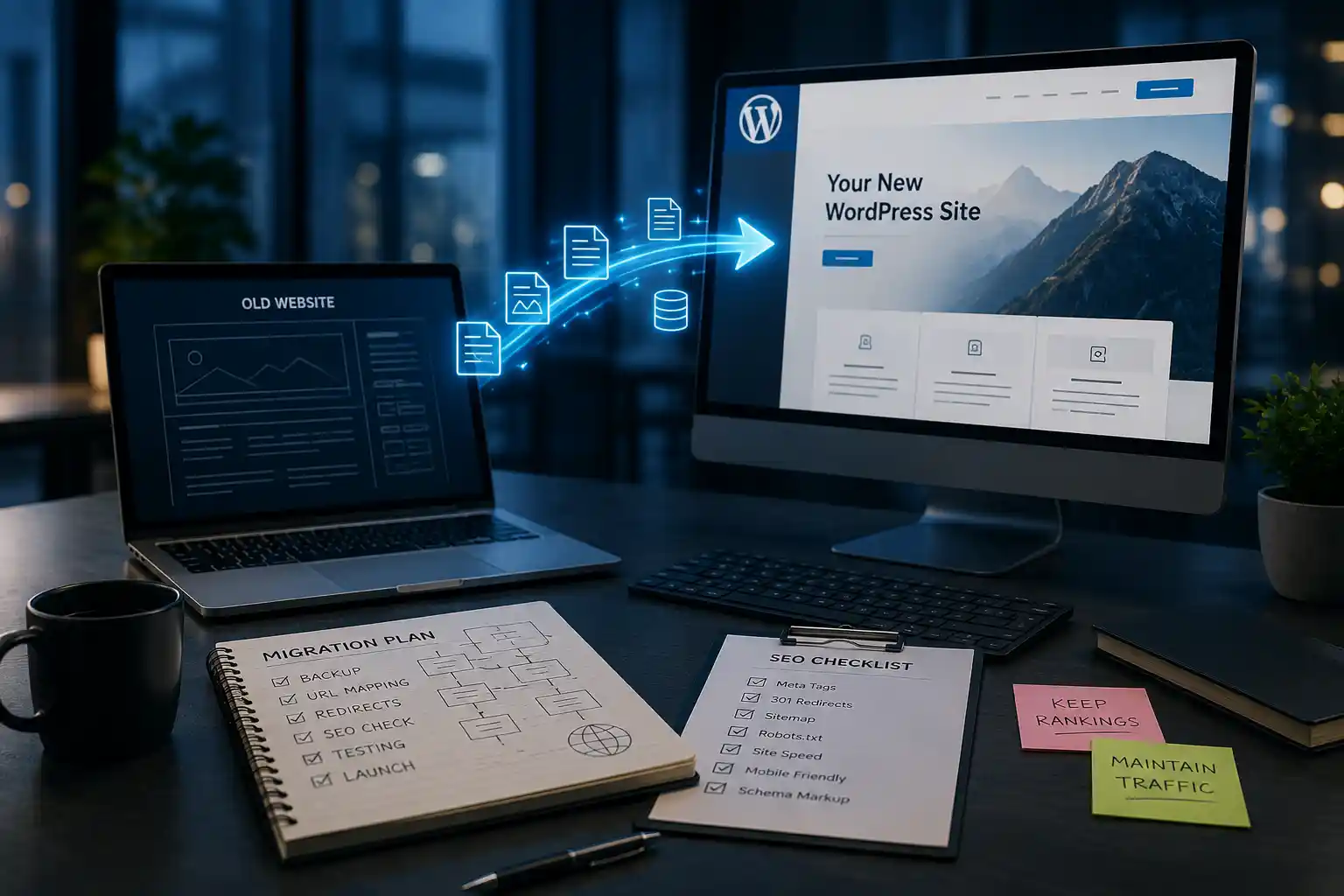
A professional website migration normally includes the following stages:
- Reviewing the existing website
- Backing up all files and databases
- Mapping current URLs
- Preserving SEO data
- Building the new WordPress website
- Testing functionality
- Launching the website
- Monitoring SEO performance after launch
Each stage supports the next, reducing the chances of unexpected ranking losses once the website becomes live.
Start With a Complete SEO Audit
Before changing a single page, you first need to understand what already works. This starts with a comprehensive technical SEO audit, which identifies the pages, keywords, and technical assets that should be protected throughout the migration. An SEO audit identifies the pages, keywords, and technical elements that contribute to your current search visibility. Without this information, businesses often remove valuable assets without realizing their importance.
A comprehensive audit should review:
- Pages generating organic traffic
- Top-performing keywords
- Existing URL structure
- Internal linking
- Meta titles and descriptions
- Image optimization
- Structured data
- Website speed
- Crawl errors
- Backlink profile
This process creates a benchmark that guides every decision throughout the migration. We’ve worked with businesses that assumed only their service pages mattered. During the audit, they discovered several older blog posts were consistently attracting qualified visitors and introducing new customers to their services. Had those pages been removed during the migration, they would have lost an important source of organic traffic without even realizing it. Understanding your existing SEO strengths allows you to protect them instead of rebuilding them from scratch.
Preserve the SEO Value You’ve Already Earned
One of the biggest mistakes businesses make during a WordPress website migration is assuming that everything needs to change. A new platform doesn’t automatically require new URLs, completely rewritten content, or a different website structure. In fact, unnecessary changes often make it harder for search engines to understand the relationship between the old website and the new one. Your current website has already established trust with search engines. Individual pages may rank for valuable keywords, attract backlinks, and generate enquiries every month. Replacing all of that at once forces search engines to reassess the website from the ground up.
Instead, preserve the SEO elements that already contribute to your success, including:
- Existing URLs whenever possible
- High-performing content
- Heading structure
- Meta titles
- Meta descriptions
- Internal links
- Image alt text
- Schema markup
In our experience, businesses achieve far more stable results when they separate migration from content optimisation. First, migrate the website successfully. Then, once rankings have stabilised, improve content gradually based on real performance data rather than assumptions. This approach reduces risk, protects existing rankings, and gives you a much clearer picture of how the migration has affected your website.
Why 301 Redirects Are Critical During a WordPress Website Migration

If there’s one technical task that has the biggest impact on SEO during a WordPress website migration, it’s implementing 301 redirects correctly. Whenever a URL changes, search engines need to know where that page has moved. A 301 redirect provides that instruction while helping transfer the authority and ranking signals the original page has built over time. Without proper redirects, visitors who click bookmarked pages or old search results may land on a 404 error page instead of the content they expected. At the same time, search engines can no longer connect the old page with its replacement, which often leads to a decline in rankings and organic traffic.
We’ve seen businesses launch beautifully designed WordPress websites only to lose valuable leads because dozens of important service pages were no longer accessible through their original URLs. The website looked better than ever, but the technical SEO foundation had been overlooked. Whenever possible, each old URL should redirect directly to its most relevant new page rather than sending everything to the homepage. This creates a better user experience and helps search engines understand the relationship between the old and new website structure.
Create a URL Mapping Strategy Before You Migrate
A successful WordPress website migration begins with planning, and URL mapping is one of the most important parts of that process. Before development starts, every existing URL should be documented alongside its new destination. This creates a clear migration roadmap and reduces the chances of broken links after launch.
For example:
Old URL
yourwebsite.com/services/web-design.html
New URL
yourwebsite.com/web-design-services/
Although both pages may contain similar information, search engines initially treat them as different pages. Without a redirect connecting the two, the SEO authority built by the original URL can be lost.
A complete URL mapping document should include:
- Existing service pages
- Blog articles
- Landing pages
- Category pages
- Location pages
- Resource pages
- Download links
Creating this document before development begins helps developers, SEO specialists, and project managers work from the same plan instead of making decisions during launch.
Preserve Your Best-Performing Content
Many businesses assume migration is the perfect opportunity to rewrite every page on their website. While refreshing outdated content has long-term benefits, doing everything at once introduces unnecessary risk. Search engines already understand your existing content. If that content ranks well and consistently attracts qualified visitors, replacing it entirely during migration forces Google to reassess the page from scratch.
A better strategy is to migrate first and optimise later.
During a WordPress website migration, preserve the pages that already perform well and focus on maintaining their core message. Once the migration has stabilised, you can gradually improve content based on analytics, user behaviour, and keyword opportunities. We’ve found that businesses following this approach experience fewer ranking fluctuations because search engines aren’t trying to process multiple major changes simultaneously.
If your service page already ranks on the first page of Google, there’s rarely a good reason to rewrite every paragraph before migration. Improve the design, enhance the user experience, and strengthen the calls to action, but preserve the SEO value that page has already earned.
Don’t Lose Your Metadata During Migration
Metadata is one of the easiest SEO elements to overlook, yet it plays a significant role in search visibility and click-through rates. When moving from another platform to WordPress, it’s common for page titles, meta descriptions, and social sharing data to disappear if they aren’t migrated properly.
Every important page should retain:
- SEO title
- Meta description
- Focus keyword targeting
- Open Graph tags
- Twitter Card information
- Canonical tags
One common mistake we see is businesses rebuilding metadata from memory after the website launches. Unfortunately, this often results in weaker titles, inconsistent descriptions, or missing optimisation across important pages. Instead, export your metadata before migration and compare it against the new WordPress website during testing. This simple step helps preserve your existing SEO performance while reducing unnecessary work after launch.
Protect Your Internal Linking Structure
Internal links help search engines understand how your website is organised. They also guide visitors towards related services, useful resources, and conversion-focused pages. During a WordPress website migration, every internal link should be reviewed to ensure it points to the correct destination.
Your internal linking structure should:
- Connect related services naturally
- Support the buyer journey
- Avoid unnecessary redirect chains
- Link to updated URLs
- Strengthen topical relevance
Imagine a visitor reading a blog about website design and clicking a link to your development services. If that link leads to a deleted page or an outdated redirect, the user experience immediately suffers. Search engines notice these issues as well. We’ve audited websites where hundreds of internal links still pointed to the old URL structure months after migration. Although visitors eventually reached the correct pages through redirects, the unnecessary extra step reduced crawl efficiency and created avoidable technical issues. Updating internal links before launch creates a cleaner website architecture for both users and search engines.
Technical SEO Should Be Verified Before Launch
A visually attractive website means very little if search engines can’t crawl and understand it properly. Before launching your new WordPress website, review every important technical SEO element to ensure nothing has been overlooked.
This includes:
- XML sitemap generation
- Robots.txt configuration
- Canonical tags
- Structured data
- Breadcrumb navigation
- HTTPS implementation
- Crawlability
- Indexing settings
We’ve encountered businesses that accidentally launched their new website with search engine indexing disabled because the development settings were never updated. Everything looked perfect to visitors, but Google couldn’t index the site. Issues like these are surprisingly common and can take weeks to recover from if they aren’t identified quickly. Treat technical SEO as part of your launch checklist rather than something to fix later.
Improve Website Speed During the Migration

One of the biggest advantages of a WordPress website migration is the opportunity to improve website performance. Older websites often contain unnecessary code, oversized images, outdated plugins, and inefficient page structures that slow down loading times. Migration provides the perfect opportunity to remove these issues and build a cleaner, faster website. This is also the ideal time to invest in website speed optimization to improve loading times, user experience, and overall search performance.
Focus on improving:
- Image optimisation
- Browser caching
- Code minification
- Server response time
- Lazy loading
- Core Web Vitals
- Mobile loading speed
A faster website benefits every stage of the customer journey. Visitors spend more time browsing, pages load more smoothly, and search engines recognise the improved user experience. We’ve seen businesses reduce page load times by several seconds after migrating to WordPress with properly optimised hosting and modern performance practices. Faster websites don’t just improve SEO—they also create a more professional first impression for potential customers.
Don’t Forget Mobile Users
Today’s customers expect every website to work flawlessly on smartphones and tablets. Investing in responsive website design ensures your WordPress website delivers a consistent experience across every device. If your new WordPress website only performs well on desktop devices, you’re likely losing opportunities before visitors even contact your business. During migration, test every important page on multiple screen sizes.
Pay close attention to:
- Navigation menus
- Contact forms
- Buttons
- Images
- Text readability
- Page speed
- Interactive elements
In our experience, businesses often focus heavily on homepage design while overlooking deeper service pages. Those pages are frequently where visitors decide whether to contact your business, making mobile usability just as important as desktop performance. A successful WordPress website migration isn’t complete until the website provides a consistent experience across every device.
Common WordPress Migration Mistakes That Can Hurt Your SEO

A WordPress website migration doesn’t fail because WordPress is a poor platform. In most cases, it fails because important SEO considerations are overlooked during planning or launch. Businesses often invest heavily in a new design but underestimate the technical work required to preserve their search visibility.
We’ve reviewed migration projects where companies blamed WordPress for ranking losses, only to discover that the real issues were missing redirects, deleted pages, or indexing errors. The platform wasn’t the problem—the migration process was. Understanding these common mistakes can help you avoid costly setbacks and protect the SEO value you’ve spent years building.
Treating Migration as a Design Project Instead of an SEO Project
One of the biggest mistakes businesses make is focusing entirely on how the new website looks while ignoring how search engines will interpret the changes. A professional website redesign, improved branding, and better visuals certainly create a stronger first impression, but they won’t protect your rankings if critical SEO elements disappear during migration.
A successful WordPress website migration should involve designers, developers, and SEO specialists working together from the beginning. Every design decision should also consider its impact on search visibility, user experience, and lead generation.
In our experience, businesses that involve SEO planning early rarely experience major ranking losses because technical requirements are addressed before development begins rather than after the website goes live.
Removing Pages Without Reviewing Their SEO Value
During a redesign, it’s common to remove pages that appear outdated or unnecessary. However, appearance alone doesn’t determine SEO value. Some pages quietly generate organic traffic, earn backlinks, or rank for long-tail keywords that consistently bring qualified visitors to your website. Removing those pages without analysing their performance can reduce your overall search visibility.
Before deleting any page, ask yourself:
- Does it receive organic traffic?
- Does it rank for valuable keywords?
- Has it earned quality backlinks?
- Can the content be updated instead?
- Would redirecting it provide a better user experience?
We’ve seen businesses remove dozens of blog posts simply because they looked old. After checking Google Search Console, they discovered those same articles were attracting thousands of impressions every month. Updating valuable content is often a better strategy than deleting it altogether.
Forgetting About Existing Backlinks
Backlinks remain one of the strongest indicators of authority in Google’s ranking algorithm. Every quality website linking to your pages contributes to your SEO performance. During a WordPress website migration, those backlinks should be protected. If an external website links to one of your service pages and that page disappears after migration, the authority associated with that backlink may also be affected.
Before launching your new website, identify pages that have earned valuable backlinks and ensure they either remain unchanged or are redirected correctly. We’ve worked with businesses that unknowingly removed pages linked by industry directories, local organisations, and reputable publications. Although the redesign was successful from a visual standpoint, losing those links affected their search performance over time. Protecting backlink equity should always be part of your migration strategy.
Changing Too Many Things at Once
Migration often feels like the perfect opportunity to refresh everything. Businesses commonly decide to:
- Change the platform
- Redesign the website
- Rewrite every page
- Update branding
- Modify navigation
- Change URLs
- Launch new services
While each of these improvements may be beneficial individually, making them all simultaneously makes it much harder to measure what’s affecting your rankings. Imagine your organic traffic drops after launch. Was it caused by rewritten content, changed URLs, new navigation, missing redirects, or technical SEO issues? When everything changes together, identifying the real cause becomes much more difficult.
One common mistake we see is businesses trying to complete an entire digital transformation in one launch. A phased approach is usually more effective because it reduces risk and provides clearer performance data. Whenever possible, migrate first, monitor results, and then continue improving content and design based on actual user behaviour.
What Should You Check Immediately After Launch?
Launching your new website isn’t the finish line. It’s the beginning of the monitoring phase. The first few days after a WordPress website migration are extremely important because this is when search engines begin crawling the updated website and processing the changes. Rather than assuming everything is working correctly, review your website carefully.
Check that:
- Every important page loads successfully.
- Redirects point to the correct destinations.
- Contact forms work properly.
- Navigation links are functioning.
- Images display correctly.
- XML sitemap has been submitted.
- Google Search Console reports no major crawl errors.
- Analytics tracking is collecting data.
- Important pages are indexed.
We’ve found that businesses performing a structured post-launch review identify small issues before they become major SEO problems. Fixing a broken redirect on day one is far easier than discovering it several weeks later after rankings have already declined.
How Long Does It Take for Rankings to Stabilise?
This is one of the first questions clients ask before starting a WordPress website migration, and understandably so. The honest answer is that every website is different. Several factors influence how quickly rankings stabilise, including:
- Website size
- Domain authority
- Number of URL changes
- Crawl frequency
- Redirect accuracy
- Technical SEO quality
- Content consistency
For smaller business websites with minimal structural changes, rankings may remain relatively stable or recover within a few weeks. Larger websites with hundreds of pages naturally take longer because search engines need additional time to crawl, process, and evaluate the updated structure. We’ve managed migrations where rankings remained almost unchanged after launch because every redirect, metadata element, and technical SEO requirement had been carefully planned. We’ve also seen businesses spend months recovering from migrations where those details were ignored.
The migration strategy, not WordPress, is usually the deciding factor.
Should You Migrate Your Website Yourself?
There are plenty of migration plugins and tutorials available online, making it tempting to handle everything yourself. For a small brochure website with only a few pages, that approach may be perfectly reasonable. However, the situation changes when your website is responsible for generating enquiries, appointments, or sales.
A business website often includes:
- Years of SEO history
- Hundreds of indexed pages
- Valuable backlinks
- Service pages
- Blog content
- Lead generation forms
- Third-party integrations
In these cases, the cost of a failed migration can easily exceed the cost of hiring professionals to plan it correctly from the start. I always advise business owners to evaluate what is at risk rather than focusing only on the cost of migration. If organic search is one of your primary lead sources, protecting those rankings should be considered an investment rather than an expense.
A professionally managed WordPress website migration reduces technical risks, shortens recovery time, and gives you confidence that your website is positioned for long-term growth instead of short-term setbacks.
Final Thoughts: A Successful Migration Starts With the Right Strategy
Moving to WordPress is one of the best long-term decisions many businesses can make, but success isn’t determined by the platform itself. It’s determined by the strategy behind the migration. A carefully planned WordPress website migration protects the SEO authority you’ve built over time while giving your business the flexibility to grow without technical limitations.
Instead of rushing through the process, focus on preserving the assets that already contribute to your online visibility. Keep valuable content, implement accurate 301 redirects, retain your metadata, test every important page before launch, and monitor performance after the migration is complete.
We’ve seen businesses successfully migrate from platforms such as Wix, Joomla, Drupal, Squarespace, and custom-built CMS solutions while maintaining — and in some cases improving — their organic search performance. The difference was never the platform they moved from. It was the planning, testing, and SEO strategy that supported the migration from beginning to end.
If your website generates enquiries, appointments, or sales through organic search, migration should never be treated as simply another development project. It’s an opportunity to strengthen your technical foundation, improve the user experience, and prepare your business for sustainable long-term growth.
Ready to Migrate Your Website to WordPress?
Planning to migrate your website to WordPress without losing SEO doesn’t have to be stressful when you have the right strategy in place. Our WordPress development team follows a structured migration process that protects your existing rankings while improving website performance, usability, and scalability. From SEO audits and redirect mapping to technical implementation, testing, and post-launch monitoring, every stage is designed to minimise risk and maximise long-term growth.
Whether you’re moving from Wix, Shopify, Joomla, Drupal, Squarespace, or a custom-built website, we’ll help you complete your WordPress website migration with confidence while preserving the search visibility your business depends on.
Book a free consultation with our team to discuss your migration project and receive a customised WordPress migration plan tailored to your business goals.
Frequently Asked Questions
1. Can I migrate my website to WordPress without losing SEO rankings?
Yes. If the migration is planned correctly, you can preserve your rankings. Proper 301 redirects, URL mapping, metadata preservation, and technical SEO testing help search engines understand your new website without losing the authority you’ve already earned.
2. Why do websites lose rankings after a WordPress migration?
Most ranking losses occur because of migration mistakes rather than WordPress itself. Missing redirects, deleted pages, broken internal links, indexing issues, and poor technical SEO are the most common causes.
3. How long does a WordPress website migration usually take?
The timeline depends on your website’s size and complexity. A small business website may take a few weeks, while larger websites with hundreds of pages or custom functionality often require additional planning and testing before launch.
4. What is the most important SEO task during a website migration?
Creating accurate 301 redirects is one of the most critical steps. Redirects help transfer ranking signals from old URLs to new ones while preventing visitors from landing on broken pages.
5. Should I redesign my website while migrating to WordPress?
You can, but combining a redesign with a migration increases complexity. Many businesses achieve better results by preserving SEO-critical elements during migration and introducing larger design or content improvements after rankings have stabilised.
6. Will my backlinks still help my SEO after migration?
Yes, as long as the linked pages remain available or redirect correctly. Protecting pages with valuable backlinks is an essential part of every successful WordPress website migration.
7. Do I need to submit a new XML sitemap after moving to WordPress?
Yes. Submitting an updated XML sitemap through Google Search Console helps search engines discover your new website structure more efficiently and speeds up the indexing process.
8. How long does it take for SEO rankings to recover after migration?
Some websites experience little or no ranking fluctuation, while others require several weeks for search engines to process the changes. Recovery time depends on website size, technical implementation, and the overall quality of the migration.
9. Should I monitor my SEO after the migration is complete?
Absolutely. Review keyword rankings, crawl errors, indexing reports, website traffic, and conversions during the first few weeks after launch to identify and resolve issues quickly.
10. Should I hire professionals for a WordPress website migration?
If your website generates leads or sales through organic search, working with experienced professionals significantly reduces migration risks. A structured migration protects your rankings, improves technical performance, and creates a stronger foundation for future growth.