Let’s talk

BOOKING WEBSITE DEVELOPMENT / AVENZO DIGITAL

Your services.
Their next booking.
A clearer journey.

Booking website development that connects your services, availability and customer next steps. Plan appointments, reservations and a practical workflow for the team managing them.

Services & availabilityPayments & calendarsReminders & changes
AVENZO / INTERFACE & CUSTOMER EXPERIENCE
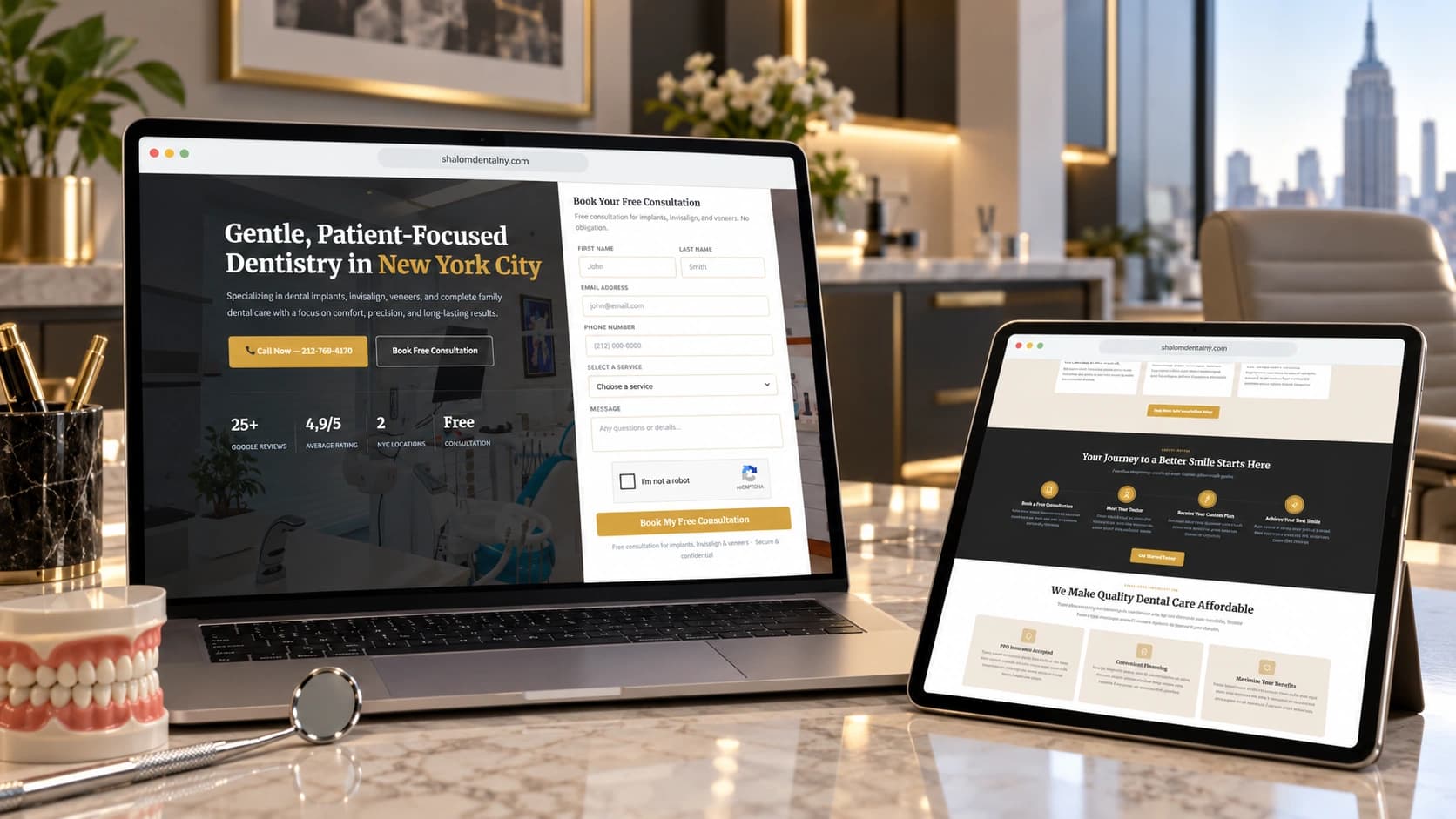
Shalom Dental NYC website in a cinematic 3D portfolio compositionShalom Dental NYC
Clear service choices. Considered booking journeys.Published Avenzo work. Read each project for its actual scope.
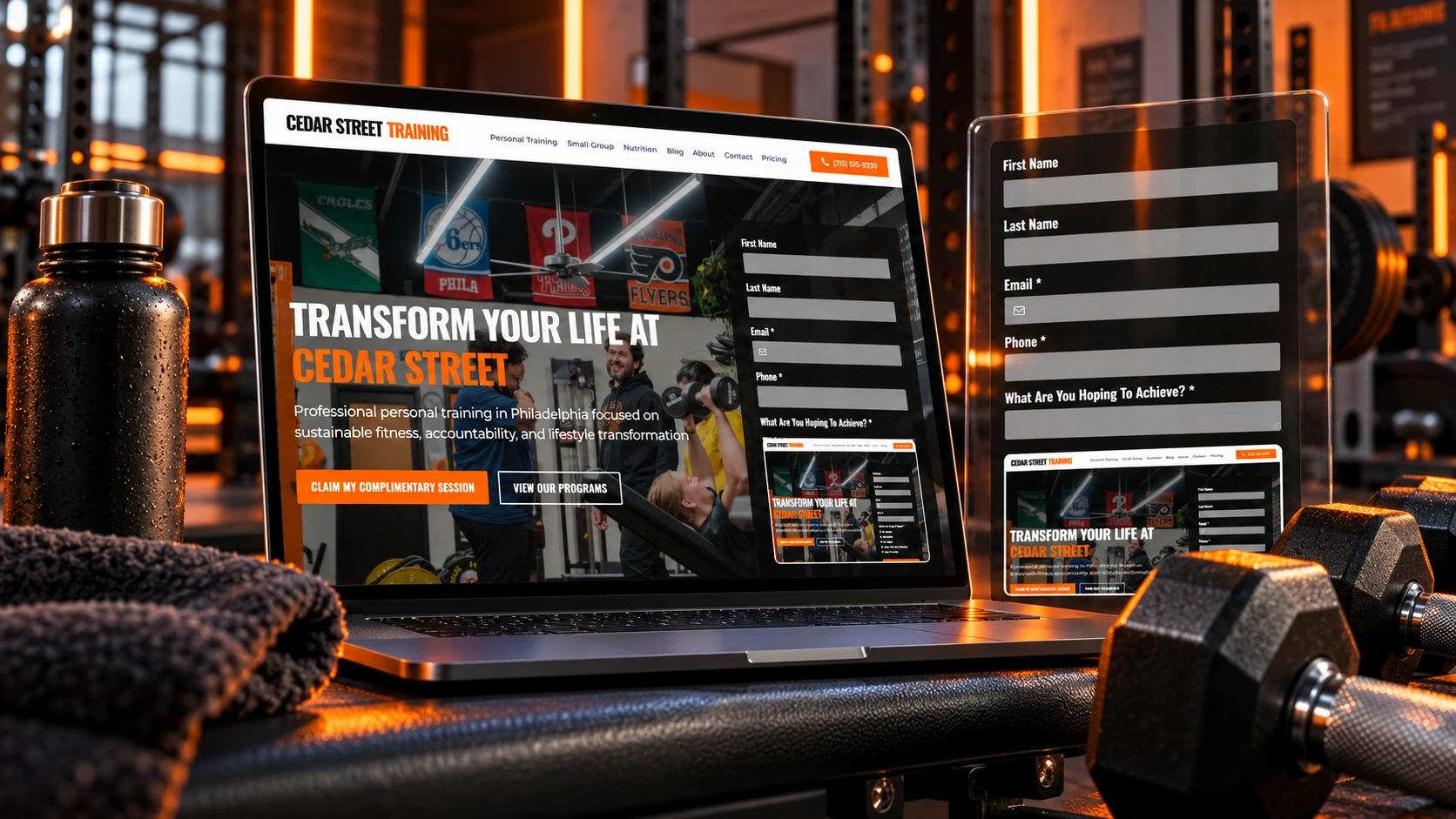
Cedar Street Training website in a cinematic 3D portfolio composition
Connect the service, availability and confirmation around the customer.ServicesAvailabilityBookings

A BOOKING FLOW NEEDS MORE THAN A CALENDAR

The right service.
A suitable time.
A clear confirmation.

The customer’s booking and the team’s schedule need to work together. We map the service rules, availability, payment and change process before selecting the implementation.

  • Define services, staff, locations and capacity
  • Review calendars, payments and notification requirements
  • Agree booking, change and launch checks
YOUR SERVICES. YOUR CALENDAR. YOUR CUSTOMER JOURNEY.

How should customers book with you?

Tell us what people book, who delivers the service and which system you use today. We’ll follow up to discuss the booking requirements.

A current website is not required. Service rules, integrations, fees and operating responsibilities are agreed before implementation.

Your details are used to respond to this enquiry. Privacy policy

Not sure which booking requirements matter?Build a discussion list and review your launch preparation.
Try the booking planner

CONNECTED BOOKING WEBSITE DEVELOPMENT

Make booking clearer.
Connect the team behind it.

A single-service appointment site and a multi-location operation need different decisions. The scope reflects how customers book and how the team delivers.

Shalom Dental NYC website in a cinematic 3D portfolio compositionAppointment & consultation websites

Let customers choose the right service.

Connect useful service information with a clear booking action. Explain duration, location and what the customer needs to know before selecting a time.

  • Service and appointment information
  • Mobile booking entry points
  • Clear availability and next steps
Discuss this direction
Cedar Street Training website in a cinematic 3D portfolio compositionStaff & location booking flows

Match the journey to the operation.

Plan the staff, location, resource and capacity rules that sit behind the calendar. Give the team a practical way to manage reservations and changes.

  • Staff and resource requirements
  • Locations, capacity and buffer rules
  • Administration and change workflows
Discuss this direction
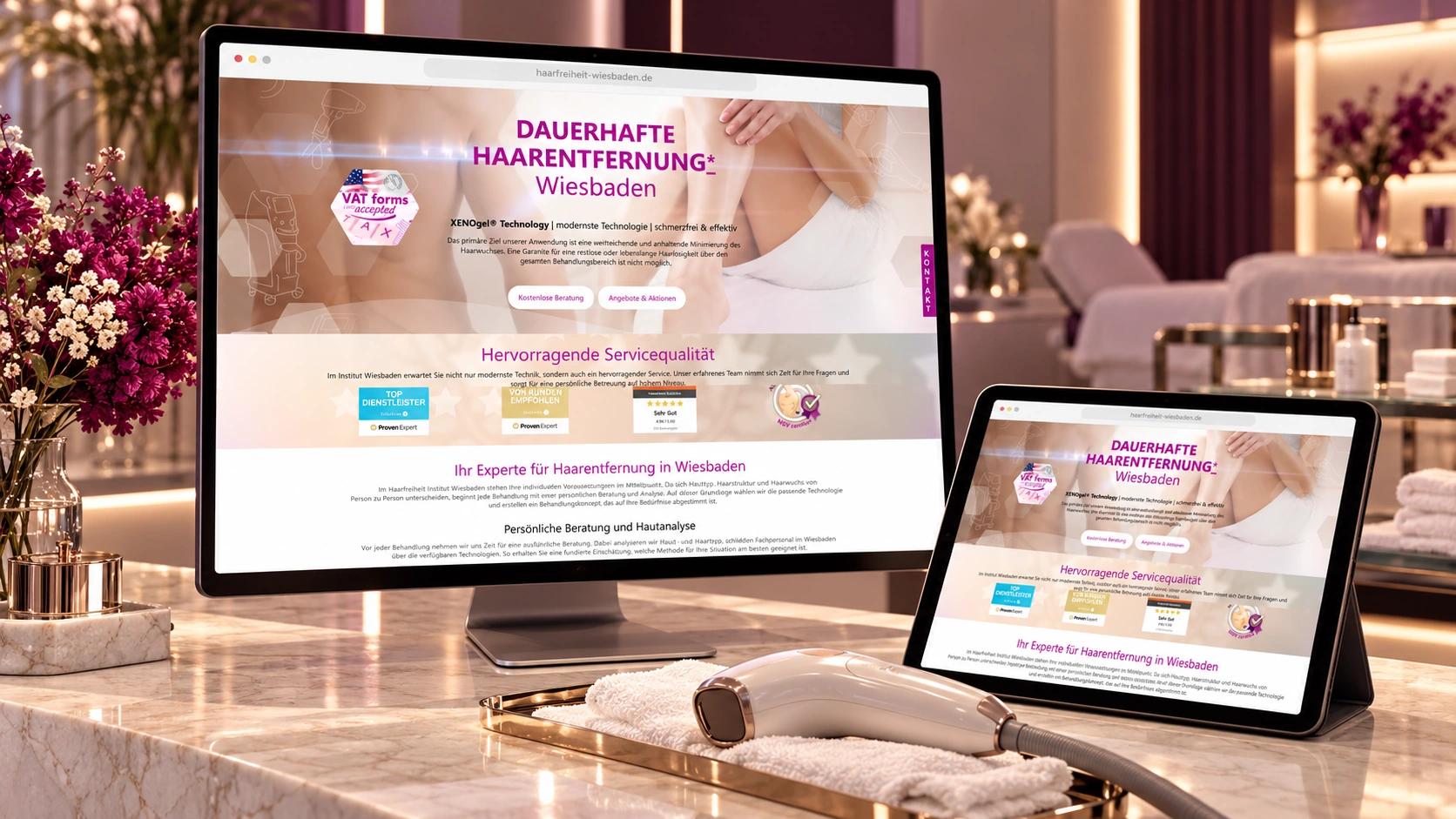
Haarfreiheit Wiesbaden website in a cinematic 3D portfolio compositionPayments, reminders & changes

Connect confirmation with what happens next.

Define payment, confirmation and reminder behaviour together. Clarify cancellation, rescheduling and the handoff when something needs staff attention.

  • Deposits and payment requirements
  • Confirmations and reminder content
  • Rescheduling and exception handling
Discuss this direction

Portfolio imagery shows published service websites and customer journeys. Booking-system features are only claimed where documented in the project.

FROM THE SERVICE PAGE TO THE CONFIRMED BOOKING

Choose. Schedule. Confirm.
Know what happens next.

01

Choose

Explain the service, duration, location and suitable customer.

02

Schedule

Show the available options and collect the required booking details.

03

Confirm

Connect agreed payment rules with the booking status and confirmation.

04

Manage

Explain reminders, rescheduling, cancellation and staff support.

Each step needs clear rules and a useful response when availability, payment or customer plans change.

BEFORE WE CHOOSE THE BOOKING SETUP

Six decisions.
A more complete booking plan.

01

What can customers book?

Define services, durations, locations, eligibility and the information needed before choosing.

02

What controls availability?

Map staff, resources, capacity, buffers, lead times and time-zone requirements.

03

What confirms a booking?

Agree instant confirmation, approval or enquiry status, plus any deposit or payment rules.

04

Which systems must connect?

Review calendars, payment providers, notifications and customer-management tools.

05

How can plans change?

Define rescheduling, cancellation, refund and staff exception-handling responsibilities.

06

What needs verifying before launch?

Check availability, booking status, payment outcomes, messages and the administration journey.

BOOKING DESIGN, SETUP & INTEGRATION

A useful customer journey.
A practical operating plan.

ONE CONNECTED BOOKING DELIVERY SCOPE

The customer’s booking.
The team’s schedule.

Bring the website, availability rules and post-booking steps into one agreed delivery scope.

Scope my booking website

Service pages & booking UX

Clear service information and responsive steps for choosing options and providing booking details.

Availability & capacity rules

Staff, resources, duration, buffers and location requirements mapped to the proposed setup.

Deposits & payment journeys

Agreed payment methods, status changes and failed-payment or refund requirements reviewed together.

Calendar & system connections

Provider access, sync behaviour and operational dependencies assessed before implementation.

Confirmations, reminders & changes

Message triggers and customer instructions connected with booking, rescheduling and cancellation rules.

Administration & launch checks

Customer and staff journeys verified against the agreed requirements, with practical handover.

CHOOSE THE RIGHT STARTING POINT

Launch the booking journey.
Or improve the next step.

The proposal identifies the website, booking rules, integrations and verification included, plus subscriptions and ongoing operating responsibilities.

01 / NEW WEBSITE

A connected booking launch

  • Service and website requirements
  • Agreed booking setup and page journey
  • Customer, payment and launch checks
02 / EXISTING JOURNEY

A focused booking improvement

  • Review current customer and staff steps
  • Scope interface, content or rule changes
  • Verify the affected booking outcomes
03 / CONNECTED OPERATION

Integration & workflow scope

  • Review calendars, providers and access
  • Define data, notification and change rules
  • Confirm verification and ongoing ownership
Help me choose the booking scope Final fees and delivery depend on the agreed requirements. Hosting, provider charges and ongoing support are clarified in the proposal.

AVENZO’S PUBLISHED DIGITAL WORK

Different organisations.
Clearer digital journeys.

Explore published work selected for interface, service and information journeys. Each project explains its actual delivery scope.

Shalom Dental NYC website in a cinematic 3D portfolio compositionAVENZO / DIGITAL PROJECT

Dental & Healthcare

Shalom Dental NYC

Treatment discovery, patient trust & appointment enquiries

Explore the project
Cedar Street Training website in a cinematic 3D portfolio compositionAVENZO / DIGITAL PROJECT

Fitness & Coaching

Cedar Street Training

Programs, trust, reviews & fitness conversion journey

Explore the project
Haarfreiheit Wiesbaden website in a cinematic 3D portfolio compositionAVENZO / DIGITAL PROJECT

Beauty & Personal Care

Haarfreiheit Wiesbaden

Treatment education, trust & consultation enquiries

Explore the project

Examples show published website delivery. Booking integrations, automation and measured results are only claimed where documented.

FROM BOOKING RULES TO HANDOVER

Map the rules.
Test the customer journey.

01

Define & choose

Map services, availability and operational rules, then review the booking platform or integration approach.

02

Design & connect

Build the agreed website journey, configure booking rules and connect scoped providers.

03

Verify & hand over

Check customer and staff journeys, payment outcomes and messages before agreeing launch and ownership.

Every project has a story.

Selected for Booking Website Development. Pick a book to explore the published project scope, design thinking and website. Examples describe delivery, not guaranteed results.

OUR PACKAGES

Booking Website Development starting points.

Choose your Booking Website Development engagement around your requirements. Pricing is confirmed after reviewing scope, content, integrations and delivery responsibilities; these options are not fixed-price offers.

01 / Booking Website Development

Booking journey review

Scoped quote
Scope confirmed in your proposal
  • Service and customer-flow review
  • Availability and booking-rule requirements
  • Provider and integration constraints
  • Prioritised next steps and implementation scope
Discuss This Package
03 / Booking Website Development

Booking improvements & support

Custom scope
Scope confirmed in your proposal
  • Agreed interface or integration improvements
  • Defined maintenance and support ownership
  • Completed-work and next-step review
  • Provider costs and responsibilities clarified
Discuss This Package
Booking Website Development

Booking journey review

Scoped quote
  • ✓ Service and customer-flow review
  • ✓ Availability and booking-rule requirements
  • ✓ Provider and integration constraints
  • ✓ Prioritised next steps and implementation scope
Get Started

BEFORE THE BOOKING BUILD

Map the requirements.
Prepare the checks.

Build a booking requirements list and track the launch questions your team has confirmed. These tools run in your browser; they do not inspect your calendar or booking system or send us your selections.

01 / BOOKING REQUIREMENTS PLANNER

How should the booking journey work?

Select the requirements you already know to prepare a practical booking brief.

Your booking requirements

Select at least one requirement to build your list.

02 / IMPLEMENTATION PREPARATION

What has the team verified?

Mark the items already reviewed. Use the remaining questions to prepare the release plan.

0 of 8preparation items confirmed by you
Your booking preparation
Self-reported preparation, not automated release approval. Complete the agreed testing and confirm responsibilities with the team delivering the booking website.

BEFORE THE FIRST ONLINE BOOKING

Booking website questions.
Clear answers.

Understand the rules, integrations and responsibilities behind the booking journey.

Cedar Street Training website in a cinematic 3D portfolio composition

Need more than a booking flow? Explore web application development for wider portal and operational requirements.

What types of bookings can the website support?

We can scope appointment, consultation, service, class or resource-booking journeys. The setup depends on duration, capacity, staff, location, payment and confirmation rules. Discovery establishes which requirements fit the proposed platform or integration.

Can we keep the booking system we already use?

We assess its embed, API and integration options before recommending changes. Where practical, the website can connect to an existing system. The scope identifies limitations, account access and third-party responsibilities.

Can customers choose a staff member or location?

That can be considered in the requirements. We map the relationship between services, staff, locations and resources, then review availability and interface options supported by the selected setup.

Can we take deposits or payment when someone books?

Payment can be scoped after confirming the provider, supported methods, deposit rules and booking status changes. Cancellation, refund and failed-payment behaviour need agreement and testing. Transaction fees and provider costs are separate unless included.

Can the website sync with our calendars?

We review the calendar provider, account permissions, sync direction and availability rules. Time zones, delays, external changes and conflict handling need to be tested for the chosen integration; calendar sync is not assumed to prevent every conflict automatically.

Can you add confirmations and reminders?

We can review email or message notifications supported by the selected platform. The scope defines triggers, message content, provider access, delivery checks and the team’s response to failed or changed bookings.

What does a booking website cost?

Pricing depends on the website pages, booking rules, staff or location setup, integrations and migration requirements. The engagement options on this page are scoped quotes. Your proposal states the included work, subscriptions and ongoing responsibilities.

Will the website guarantee more bookings or fewer no-shows?

No. Demand, traffic, pricing, policies and how the team operates also affect outcomes. We focus on a clear booking journey and verification of the agreed rules, payments, notifications and administration.

MAKE THE NEXT STEP CONCRETE

Your services.
Their next appointment.
Let’s plan the booking journey.

Tell us what customers book and how the team manages it today. We’ll help define a practical next step.

Avenzo robot mascot
YOUR SERVICES. YOUR CALENDAR. YOUR CUSTOMER JOURNEY.

How should customers book with you?

Tell us what people book, who delivers the service and which system you use today. We’ll follow up to discuss the booking requirements.

A current website is not required. Service rules, integrations, fees and operating responsibilities are agreed before implementation.

Your details are used to respond to this enquiry. Privacy policy